
NurViewer · Batch & document comparison
Compare document revisions
Two documents have nearly identical names, but you need to know what changed. Alternating windows makes omissions hard to see and forces you to remember one version while reading the other.
THE PRACTICAL VALUE
Why this step deserves its own workflow
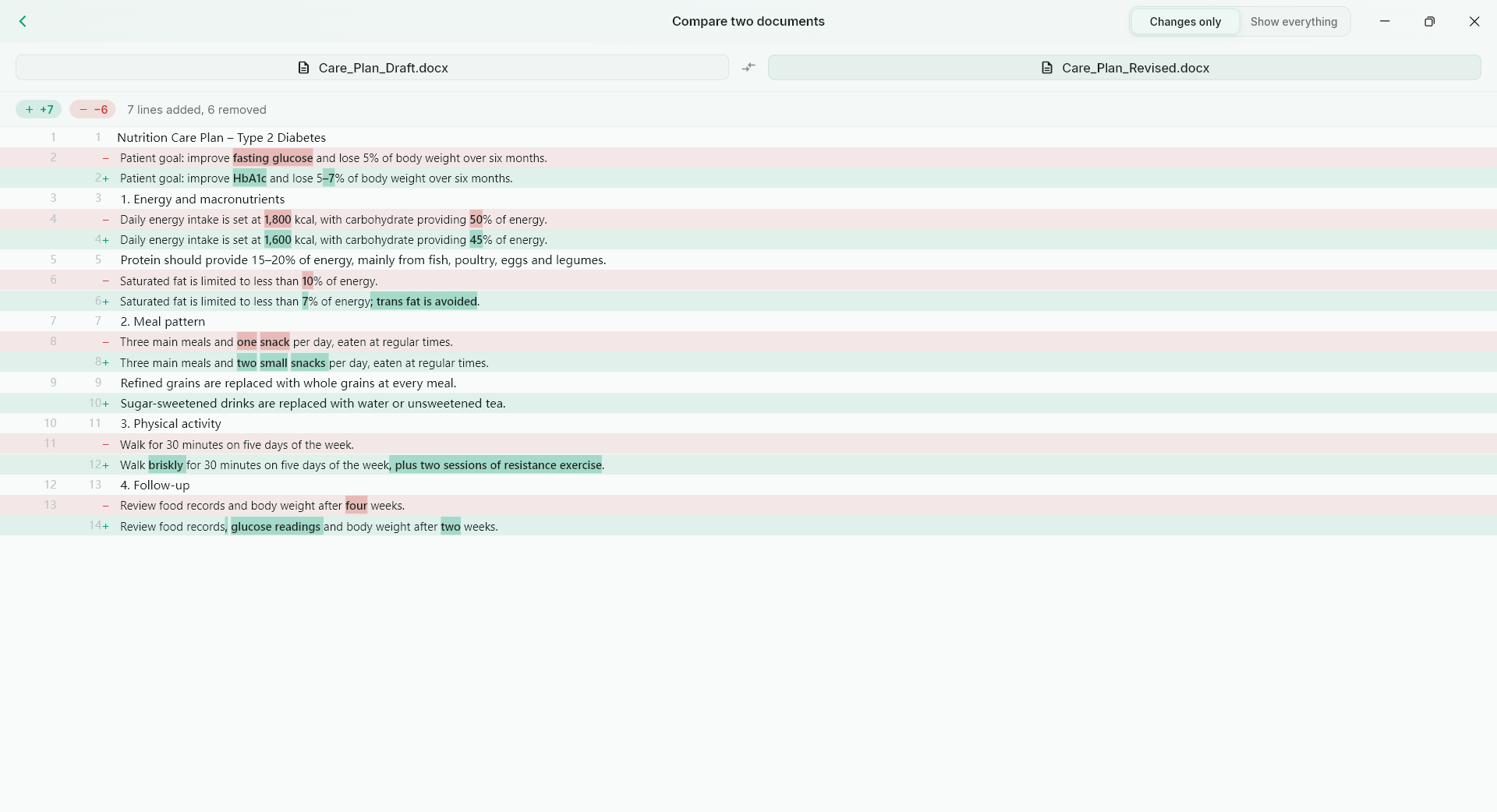
Pro document comparison brings supported versions into a dedicated review workflow. Inspect differences in context and use the source files to confirm important edits. It supports the practical task of deciding whether the new report or draft contains the changes you expected.
A PRACTICAL SEQUENCE
Start with the material you actually need.
Check representative material before deciding how much more to process.
- Choose the two supported documents in the intended order.
- Inspect the reported changes with their surrounding context.
- Verify critical passages against both originals.
EDITION & SCOPE
Know the scope before you commit.
Requires Pro. Supported content extraction and layout differences affect comparison; it is not a legal redline certification or a guarantee of every semantic change.
Free has no trial expiry: common-format reading, ordinary PDF annotations and supported ordinary document/image-to-PDF export remain available. Recognition, specialist formats and advanced tools have their own allowances or tier requirements.
Compare Free, Standard and Pro →Images may retain historical layouts. Demonstration books, dictionaries and media are not bundled.
A USEFUL QUESTION
Should I accept every reported difference as a real edit?
No. Reflow, extraction and formatting can produce differences; review them in the original context.
CONTINUE THE WORKFLOW
A useful next step.
Keep reading, understanding and organising around the same material.
PDF & conversion
PDF highlights & review
Feedback scattered across email messages is hard to reconnect with a page. A reader needs to see what matters and leave a clear explanation where the issue actually appears.
Explore the workflow →PDF & conversion
Editable PDF to Word
You need to rewrite a report, not just place a picture of it inside Word. A fixed page is a poor starting point when paragraphs, headings and tables need to move with your changes.
Explore the workflow →Batch & document comparison
Batch PDF export
Preparing many files one by one repeats the same setup and interrupts other work. The real problem is the repeated handling, not simply whether an individual file can be converted.
Explore the workflow →