
NurViewer · OCR & phonetic symbols
Make scanned PDFs searchable
A scan can preserve a page perfectly while hiding every word from search. Months later, finding one term in a thick report becomes a manual page-by-page task.
THE PRACTICAL VALUE
Why this step deserves its own workflow
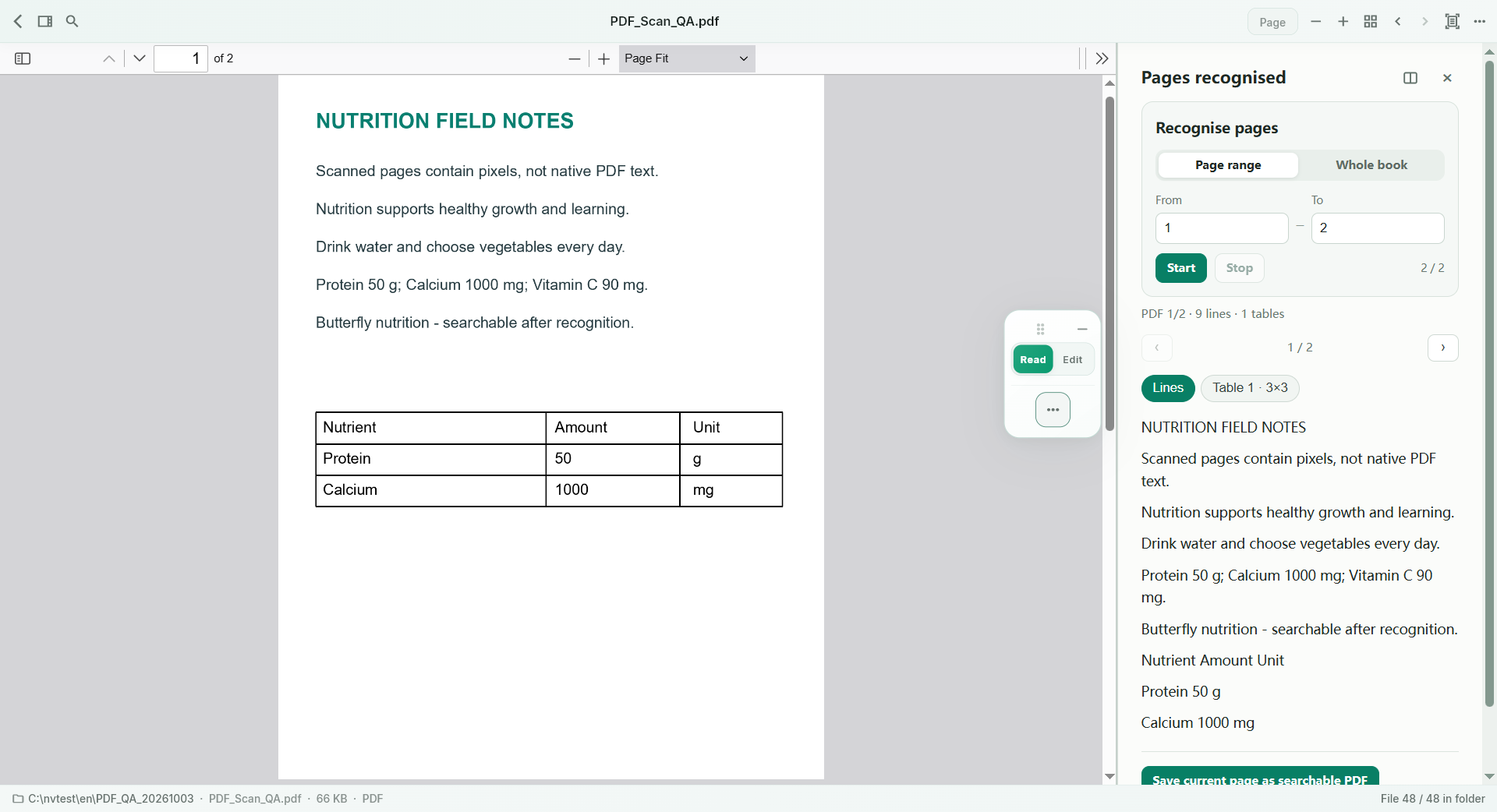
Recognise supported scanned content and produce a PDF with a searchable text layer. Keep the page image as the visual reference while enabling text finding in the saved result. This is useful for personal reference archives and study material, especially when the original appearance is important but repeated manual searching is costly.
A PRACTICAL SEQUENCE
Start with the material you actually need.
Check representative material before deciding how much more to process.
- Choose the document and the supported recognition range.
- Recognise and check representative text and reading order.
- Save the searchable PDF and verify a known term in the result.
EDITION & SCOPE
Know the scope before you commit.
Search depends on recognised text quality. Free can save a recognised single page; whole-document generation in Standard/Pro uses OCR allowance. It does not recover damaged source detail or create a fully editable page layout.
Free has no trial expiry: common-format reading, ordinary PDF annotations and supported ordinary document/image-to-PDF export remain available. Recognition, specialist formats and advanced tools have their own allowances or tier requirements.
Compare Free, Standard and Pro →Images may retain historical layouts. Demonstration books, dictionaries and media are not bundled.
A USEFUL QUESTION
Does ordinary folder search recognise all my scans first?
No. Prepare searchable text through an explicit recognition workflow; folder search does not silently OCR scans.
CONTINUE THE WORKFLOW
A useful next step.
Keep reading, understanding and organising around the same material.
OCR & phonetic symbols
Multi-column OCR reading order
When OCR reads across two columns as if they were one line, the characters may be correct but the paragraph is nonsense. Dictionaries, journals and reference pages need the reading order to survive recognition.
Explore the workflow →Find across files
Search inside a folder of documents
You remember the topic but not the filename. A folder full of reports is difficult to search when the useful clue is inside a paragraph rather than in the name of the file.
Explore the workflow →OCR & phonetic symbols
IPA phonetic-symbol OCR
A copied dictionary entry is not useful if its pronunciation is wrong. Small marks such as stress and vowel length carry meaning, yet can disappear or be confused with punctuation in a scanned English dictionary.
Explore the workflow →