
NurViewer · Table recognition
Merged headers & empty cells
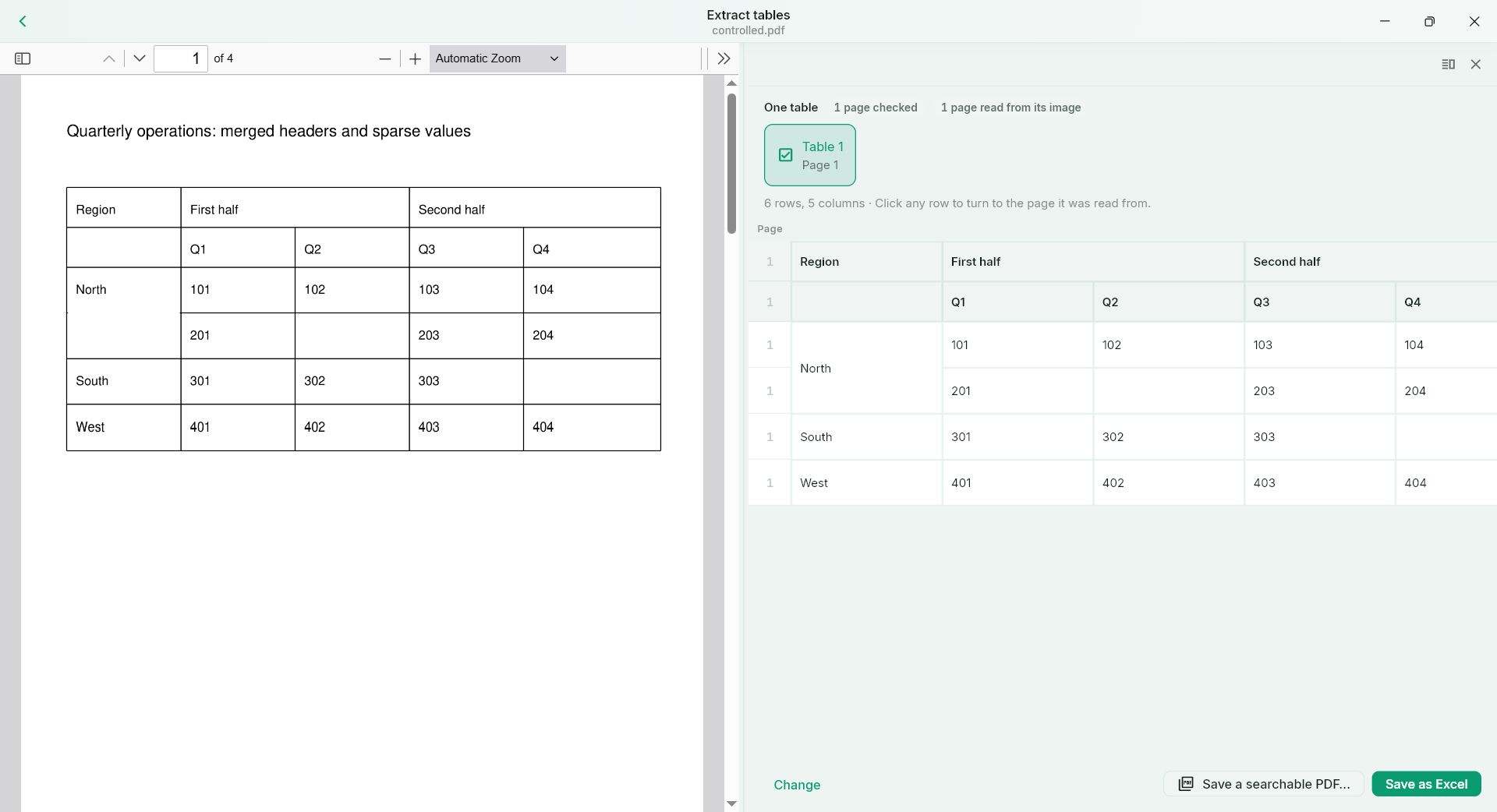
If a multi-level header is flattened or an empty cell disappears, the exported numbers can move under the wrong label. The result may look tidy while saying something different from the original.
THE PRACTICAL VALUE
Why this step deserves its own workflow
Supported structured-table recognition retains useful horizontal and vertical merged regions, row/column relationships and intentional empty cells. Compare the structure before export so the spreadsheet remains understandable. It is particularly valuable for research tables and reporting templates where a heading applies to several values.
A PRACTICAL SEQUENCE
Start with the material you actually need.
Check representative material before deciding how much more to process.
- Recognise a table with multi-level or merged headers.
- Check header spans, empty cells and values near merged regions.
- Export the structured result and inspect it in your spreadsheet tool.
EDITION & SCOPE
Know the scope before you commit.
Nested structures, irregular grids and skew can exceed supported cases. Correct geometry does not prove every character is correct; inspect important numeric cells separately.
Free has no trial expiry: common-format reading, ordinary PDF annotations and supported ordinary document/image-to-PDF export remain available. Recognition, specialist formats and advanced tools have their own allowances or tier requirements.
Compare Free, Standard and Pro →Images may retain historical layouts. Demonstration books, dictionaries and media are not bundled.
A USEFUL QUESTION
Can it recreate a formula hidden behind a printed result?
No. It recovers supported visible structure and content, not the source spreadsheet’s hidden formulas.
CONTINUE THE WORKFLOW
A useful next step.
Keep reading, understanding and organising around the same material.
Table recognition
Tables to editable Excel
A screenshot of a table is easy to send and hard to calculate with. Copying text often loses columns and empty cells, leaving you to rebuild the relationships before you can do any useful analysis.
Explore the workflow →Table recognition
Tables across PDF pages
A long report splits one table across several pages and repeats its header. Manually joining each fragment in a spreadsheet can introduce duplicate headings or put rows in the wrong order.
Explore the workflow →Table recognition
Borderless table recognition
Many comparison sheets and reports use whitespace instead of grid lines. A generic extraction can turn aligned columns into prose, even though you need a table for sorting and comparison.
Explore the workflow →